











OMTech Polar Lite vs OMTech Polar 2
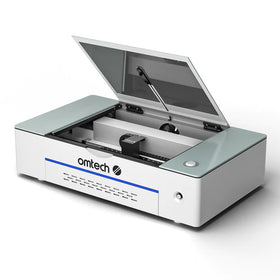
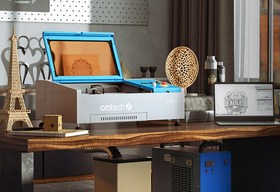
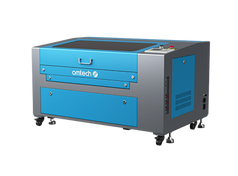
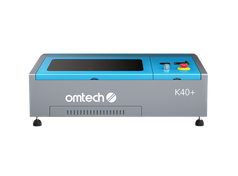
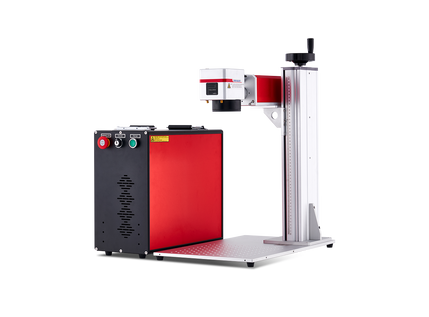
The OMTech Polar Lite 55W and the OMTech Polar 2 50W RF are both fantastic CO₂ laser engravers for small businesses from the OMTech Polar Series, designed for creators, hobbyists, and small businesses, and they are very, very similar.
Both machines can engrave and cut wood, acrylic, and leather, and many other basic laser engraving materials. Also, they both offer convenient features that make laser engraving more accessible, and are both capable of producing professional-quality projects.
However, these machines are also very different, and in many ways: they differ considerably in speed, engraving technology, working area, precision, and long-term operating requirements.
If you have to choose between them, the key deciding factor should be what you intend to create, how frequently you use your machine, and the level of detail your projects require. Let's compare what each machine offers and help you decide which one makes the most sense for your needs.

OMTech Polar Lite vs. Polar 2: Key Features Comparison
Before examining their differences in detail, here's a side-by-side comparison of the two laser engravers.
| Feature | OMTech Polar Lite 55W | OMTech Polar 2 50W RF |
| Laser technology | Glass CO₂ laser tube | Metal RF CO₂ laser tube |
| Laser power | 55W | 50W |
| Maximum engraving speed | 500 mm/s | 2,000 mm/s |
| Working area | 20.1" × 11.8" (510 × 300 mm) | 28" × 14" (710 × 360 mm) |
| Engraving precision | ±0.02 mm | ±0.02 mm |
| Camera | 5MP positioning camera | 16MP positioning camera |
| Focusing | One-click autofocus | Autofocus |
| Cooling system | Built-in water cooling, 2L tank | Air-cooled RF laser |
| Estimated laser tube lifespan | 11,000 hours | Up to 30,000 hours |
| Material height clearance | Up to 2" (51 mm) without workbed | Up to 4.53" (115 mm) |
| Pass-through openings | Front and rear | No |
| Rotary engraving | Compatible with optional rotary attachment | Basic rotary attachment included |
| Software compatibility | LightBurn, RDWorks | LightBurn, RDWorks |
| Connectivity | USB, Ethernet, Wi-Fi | USB, Ethernet, Wi-Fi, U-disk |
| Best suited for | Hobbyists, beginners, personalized gifts, and small businesses | Professional engraving, detailed artwork, larger projects, and higher-volume production |
Both machines have their strengths, but the specifications alone don't tell the whole story. Let's look at how these differences affect the projects you can create and your everyday experience using each machine.
OMTech Polar Lite vs. Polar 2: Understanding the Key Differences
1. Laser Power and Performance: 55W Glass CO₂ vs. 50W RF CO₂
At first glance, it would appear that the Polar Lite has an advantage in laser power: it has a 55W laser tube, compared to the Polar 2's 50W. However, the amount of watts a laser engraver can produce alone doesn't determine how well it performs. The technology used to generate and control the laser beam also matters.
The Polar Lite uses a conventional glass CO₂ laser tube.
The Polar Lite uses a conventional glass CO₂ laser tube.Glass CO2 tubes are great for laser cutting and engraving because it provides reliable performance at an accessible price.
Its 55W output is sufficient for cutting and engraving many common materials, including plywood, acrylic, leather, and cardboard.
For example, if you're creating wooden keychains, acrylic ornaments, engraved signs, or personalized leather accessories, the Polar Lite provides the power needed for these projects
The Polar 2 uses a metal RF (radio-frequency) CO₂ laser tube.
Unlike conventional glass tubes, RF lasers can switch their output on and off more rapidly and offer finer control over laser pulses. This allows them to produce cleaner edges, sharper details, and more consistent results when engraving intricate designs.
This difference becomes particularly noticeable when working with small lettering, detailed illustrations, photographs, and complex patterns. For instance, imagine engraving a detailed company logo onto 100 wooden business cards.
Both machines can complete the project. However, the Polar 2's RF laser can reproduce fine lines and small details more consistently, especially at higher engraving speeds.
Which should you choose?
- If your projects primarily involve cutting shapes, engraving names, or creating straightforward designs, the Polar Lite's 55W glass laser is more than capable.
- If your work requires fine details, intricate artwork, or consistent engraving quality across large production batches, the Polar 2's RF laser technology offers meaningful advantages.
It's also worth remembering that the Polar 2's RF technology doesn't automatically make it better at every cutting task. Cutting performance still depends on the material, thickness, laser settings, and the number of passes required.

2. Engraving Speed: How Much Does Faster Really Matter?
One of the most significant differences between the two machines is their maximum engraving speed. The Polar Lite offers speeds of up to 500 mm/s, while the Polar 2 reaches 2,000 mm/s. On paper, that makes the Polar 2 four times faster.
First, let's make something clear: this does not mean that every engraving job you do will finish four times sooner if you get the Polar 2. When it comes to laser engraving speeds, the actual processing times depend on many factors like the design, material, engraving settings, acceleration, and other factors.
Where the superior speed of the Polar two really makes a difference is when you are producing large quantities of products. Permit me to use an example:
Scenario A: You are engraving personalized gifts
Let's say you run a small home business selling personalized wooden coasters. On an average day, you engrave 10–15 coasters with customer names or simple designs.
The Polar Lite's 500 mm/s speed is already sufficient for this workload. Don't get me wrong: the Polar 2 would complete the engraving faster and would save you some time. But does the time saved in this scenario really justify its higher price?
Scenario B: Producing hundreds of engraved products
Now, let's say you supply customized merchandise to corporate clients. A customer orders 300 engraved wooden plaques, all featuring a detailed logo. The Polar 2's higher engraving speed can significantly reduce production time, particularly when combined with its faster RF laser response. That extra efficiency can help you complete orders sooner and free up time for additional projects.
Which should you choose?
- For occasional engraving, hobby projects, and small customer orders, the Polar Lite offers plenty of speed.
- For businesses handling frequent orders, detailed designs, or large production batches, the Polar 2's faster engraving capabilities can translate into meaningful productivity improvements.
3. Material Compatibility: What Can Each Machine Engrave?
When it comes to material compatibility, the Polar Lite and Polar 2 are pretty much the same. Both machines use CO₂ laser technology, which makes them suitable for many of the same materials. Here is a short list:
- Wood and plywood
- Acrylic
- Leather
- Paper and cardboard
- Fabric
- Rubber
- Glass
- Coated or anodized metals
If you are like most hobbyists and small businesses, these materials pretty much cover the whole range of your profitable and creative applications. So, you can use either machine to create personalized gifts, decorative signs, acrylic displays, engraved glassware, leather accessories, and wooden home décor.
However, there are some practical differences:
- The Polar Lite is particularly suitable for general-purpose cutting and engraving. Its 55W glass CO₂ laser handles everyday materials effectively, making it an excellent option for businesses that produce a variety of relatively simple products.
- The Polar 2 offers advantages when working with materials or designs that benefit from more precise laser control.
If you are engraving photographs onto wood or producing fine lettering on acrylic, for example, the RF laser's faster response can help preserve small details and reduce unwanted overburn.
Which should you choose?
- If your work involves common materials such as wood, acrylic, and leather, material compatibility alone isn't a strong reason to spend more on the Polar 2. Both machines can handle these projects.
- The Polar 2 becomes more attractive when the complexity of your designs and the quality requirements of your finished products demand greater control over the engraving process.

4. Working Area: How Much Space Do You Actually Need?
- The Polar Lite provides a working area of 20.1" × 11.8" (510 × 300 mm). That's enough space for many everyday projects, including wooden signs, coasters, ornaments, keychains, and small acrylic displays.
- The Polar 2 offers a considerably larger working area of 28" × 14" (710 × 360 mm). This gives you approximately 67% more working area than the Polar Lite.
This means the Polar 2 gives you extra space to engrave larger items and/or handle large-volume projects at once. One of the projects laser engraving businesses handle most frequently is wooden coasters measuring 4" × 4". The Polar Lite can accommodate several coasters within its working area, allowing you to engrave multiple items in one batch.
The advantage of the Polar 2's larger workspace is that it gives you more room to arrange additional coasters, which will reduce the number of batches you need to complete an order.
The difference is even more important for larger projects. If you're creating wide wooden signs, decorative wall panels, or larger acrylic displays, the Polar 2 provides more flexibility.
Front and Rear Pass-Through Opening
However, the Polar Lite has one useful feature that the Polar 2 lacks: front and rear pass-through openings. These openings allow you to feed longer, thin materials through the machine, making certain projects possible even when the material extends beyond the standard working area.
The Polar 2 doesn't have these pass-through openings. This means that although it has a larger working area, the Polar Lite may actually be more convenient for some long, narrow projects.
Which should you choose?
- Choose the Polar Lite if your projects fit comfortably within its working area or if you frequently work with longer, thin materials that benefit from pass-through access.
- Choose the Polar 2 if you regularly create larger designs or want to engrave more items in a single batch.

5. Engraving Precision and Camera Positioning
Both machines specify engraving precision of approximately ±0.02 mm. However, their camera systems differ considerably. The Polar Lite features a 5MP camera, while the Polar 2 uses a 16MP camera. Both cameras are great when it comes to helping you position designs on your materials, and you will not have to struggle with manual measurements.
For straightforward projects like engraving a name onto a wooden coaster, the Polar Lite's camera is generally all you need. You can use the camera preview to position the design before starting the job.
The Polar 2's higher-resolution camera is great to have, but where it really makes a difference is when you are positioning designs on smaller objects or arranging multiple products across its larger working area. The 16MP camera provides a more detailed view of the work surface, making it easier to identify individual objects and position designs accurately.
Which should you choose?
- For ordinary personalization projects, the Polar Lite's camera offers the convenience most users need.
- If you regularly work with small objects, detailed layouts, or multiple items that require careful positioning, the Polar 2's higher-resolution camera is a worthwhile advantage.
6. Material Height and Rotary Engraving
- The Polar Lite supports materials up to approximately 2" (51 mm) high when its workbed is removed.
- The Polar 2 RF offers a much larger maximum material height of approximately 4.53" (115 mm). This gives the Polar 2 more flexibility when working with thicker or taller objects.
Both machines also support rotary engraving, allowing cylindrical objects to rotate during the engraving process. However, the Polar Lite requires a compatible rotary attachment, while the Polar 2 includes a basic rotary axis.
If your business specializes in engraved wooden coasters, leather keychains, and flat acrylic signs, the Polar Lite's lower height clearance probably won't affect your work. But if you plan to expand into engraving cylindrical products, the additional clearance offered by the Polar 2 could become a significant advantage.
Keep in mind that the actual maximum diameter of a cylindrical object depends on the rotary attachment, its mounting arrangement, and the available clearance.
Which should you choose?
- If you mainly engrave flat materials, the Polar Lite is sufficient.
- If you frequently work with thicker objects or want more flexibility for rotary engraving, the Polar 2 is better equipped for those applications.
7. Cooling System, Maintenance, and Laser Tube Lifespan
- The Polar Lite uses a glass CO₂ laser tube with a built-in water-cooling system. Its integrated 2L water tank helps regulate the laser tube's temperature during operation.
- The Polar 2 RF uses an air-cooled metal laser tube. This eliminates the need to maintain a water-cooling circuit for the laser source, simplifying routine maintenance.
The difference in expected tube lifespan is also substantial. The Polar Lite has an estimated laser service life of approximately 11,000 hours. The Polar 2 RF offers an expected tube lifespan of up to 30,000 hours, depending on operating conditions.
Which should you choose?
- If you engrave occasionally or operate a small business with moderate production demands, the Polar Lite's cooling system and tube lifespan are perfectly reasonable.
- If your machine will operate frequently for commercial production, the Polar 2's air cooling and longer expected tube life can help reduce maintenance requirements and long-term ownership costs.

8. Software, Ease of Use, and Everyday Convenience
Both the Polar Lite and Polar 2 are designed to make desktop laser engraving relatively accessible. They support popular laser engraving software, including LightBurn and RDWorks. Both also offer autofocus capabilities, reducing the need for manual focusing adjustments.
The Polar Lite provides an approachable setup for beginners who want to learn laser engraving without dealing with an unnecessarily complicated machine. Its combination of autofocus, camera positioning, integrated cooling, and built-in air assist allows users to concentrate more on their projects.
The Polar 2 builds on this convenience with a higher-resolution camera, a larger working area, and a more advanced RF laser system. These features can improve workflow efficiency, particularly for users who frequently switch between projects or process multiple items.
Which should you choose?
- For beginners and casual creators, the Polar Lite provides an excellent balance of functionality and simplicity.
- For experienced users looking to improve production efficiency and expand their capabilities, the Polar 2 offers more room to grow.
OMTech Polar Lite vs. Polar 2: Which Should You Buy?
Now that we've examined their differences, the most important question remains: which machine is the better investment for you? The answer depends less on which machine has the most impressive specifications and more on what you actually intend to do with it.

Who Should Choose the OMTech Polar Lite?
The OMTech Polar Lite 55W Desktop CO₂ Laser Engraver is an excellent choice for hobbyists, beginners, and small businesses that want reliable cutting and engraving performance without spending more than necessary.
1. You are a beginner purchasing your first laser engraver
If you're just getting started with laser engraving, the Polar Lite provides the features needed to learn and experiment. Its 55W laser can handle a wide variety of materials, while autofocus and camera positioning help simplify the engraving process.
Instead of spending significantly more on capabilities you might not use, you can invest the savings in materials, accessories, and developing your skills.
2. You are a hobbyist or an “occasional” creator
If you primarily engrave gifts for friends, create decorations, or work on occasional DIY projects, the Polar Lite offers more than enough performance.
You probably won't benefit much from the Polar 2's higher maximum speed or longer tube lifespan if you only use your machine a few hours per week.
3. You run a small business producing simple personalized products
The Polar Lite is also suitable for entrepreneurs selling items such as:
- Personalized wooden keychains
- Engraved coasters
- Acrylic ornaments
- Leather accessories
- Wedding favors
- Small wooden signs
These products generally don't require the Polar 2's advanced RF technology. If your business receives manageable order volumes and your designs are relatively straightforward, the Polar Lite can handle your production needs.
4. You want to spend more on business essentials
Here's something worth considering: even if you have enough money to purchase the Polar 2, buying the Polar Lite could still be the better financial decision.
Suppose you're starting a personalized gift business.
Instead of spending your entire budget on a more expensive machine, you could buy the Polar Lite and use the remaining money for materials, packaging, marketing, and other business expenses. Those investments may generate more immediate value than additional engraving speed.
Who Should Choose the OMTech Polar 2?
The OMTech Polar 2 50W RF Desktop CO₂ Laser Engraver (soon to be released in Canada) is designed for users who need greater speed, precision, flexibility, and long-term production efficiency. Its higher purchase price makes the most sense when these advantages directly support your work.

1. You own or run a business handling large production volumes
If you regularly receive orders for dozens or hundreds of engraved products, the Polar 2's higher processing speed can make a significant difference. Faster engraving allows you to complete orders more efficiently and potentially increase your production capacity.
For businesses where machine time limits the number of orders they can accept, this can justify the additional investment.
2. You are a professional working with detailed artwork
If your work involves intricate illustrations, detailed logos, photographs, or small lettering, the Polar 2's RF laser technology offers greater control. This makes it particularly attractive for professional engraving services where fine details and consistent results are essential.
3. You are Planning To Scale Your Business
Perhaps you're currently producing 20 personalized products per day but expect that number to increase significantly over the next year. In that case, purchasing the Polar 2 could help you avoid upgrading your equipment too soon.
Its larger working area, higher engraving speed, and longer tube lifespan make it better suited to growing production demands.
4. Creators working on larger or taller projects
If your products regularly exceed the Polar Lite's working dimensions or height clearance, the Polar 2 offers more flexibility. Its 28" × 14" working area is particularly useful for larger signs, decorative panels, and batch production.
The additional height clearance also makes it a more versatile option for thicker objects and compatible rotary engraving projects.
5. Businesses focused on long-term operating efficiency
If you expect to use your laser engraver heavily for several years, the Polar 2's RF laser can provide long-term advantages. Its air-cooled design reduces cooling-system maintenance, while its extended tube lifespan can lower the frequency of laser source replacement. For commercial users, these benefits may help offset the higher initial investment.
Is the Extra Cost of the Polar 2 Worth It?
One way to answer this question is to consider how much additional value the Polar 2 could create for your business. Let's say upgrading to the Polar 2 saves your business 30 minutes of production time per working day. If you operate 20 days per month, that's approximately 10 hours saved monthly. Whether those hours justify the additional investment depends on what they're worth to your business.
If the saved time allows you to fulfill more orders, reduce labor costs, or meet deadlines more reliably, the Polar 2 could eventually pay for itself. But if your machine spends most of its time idle or your existing workload is already easy to manage, those potential time savings may have little financial value.
The same principle applies to precision and working area. If your customers require intricate designs or larger products that the Polar Lite cannot accommodate efficiently, the Polar 2's additional capabilities become much more valuable. But if your products are simple and fit comfortably within the Polar Lite's capabilities, spending more won't necessarily improve your business.
The best investment isn't always the machine with the highest specifications. It's the machine that gives you the capabilities you need at a price that makes sense for your projects.
Final Thoughts
The OMTech Polar Lite and Polar 2 are both capable desktop CO₂ laser engravers, but they're designed to meet different needs. The Polar Lite offers an attractive combination of affordability, versatility, and ease of use. If you are a beginner, occasional creator, or entrepreneur producing straightforward personalized items, it's often the more practical investment.
The Polar 2 takes desktop laser engraving further with its advanced RF laser technology, higher engraving speeds, larger working area, improved camera resolution, and longer expected tube lifespan. You can think of it as an upgraded model for professional engravers and growing businesses that need greater precision and production efficiency.
Ultimately, choosing between the two comes down to your priorities.
- If your goal is to create beautiful, personalized products without spending more than necessary, the Polar Lite is an excellent place to start.
- If you're looking to increase production capacity, handle more demanding projects, or invest in equipment that can support long-term business growth, the Polar 2 is worth considering.
Whichever machine you choose, you can be sure that OMTech Polar Series offers a versatile platform for turning creative ideas into finished products. You may also be interested in this complete guide on the OMTech Polar vs. xTool P2 to see how the Polar engravers compare to competing models available out there.